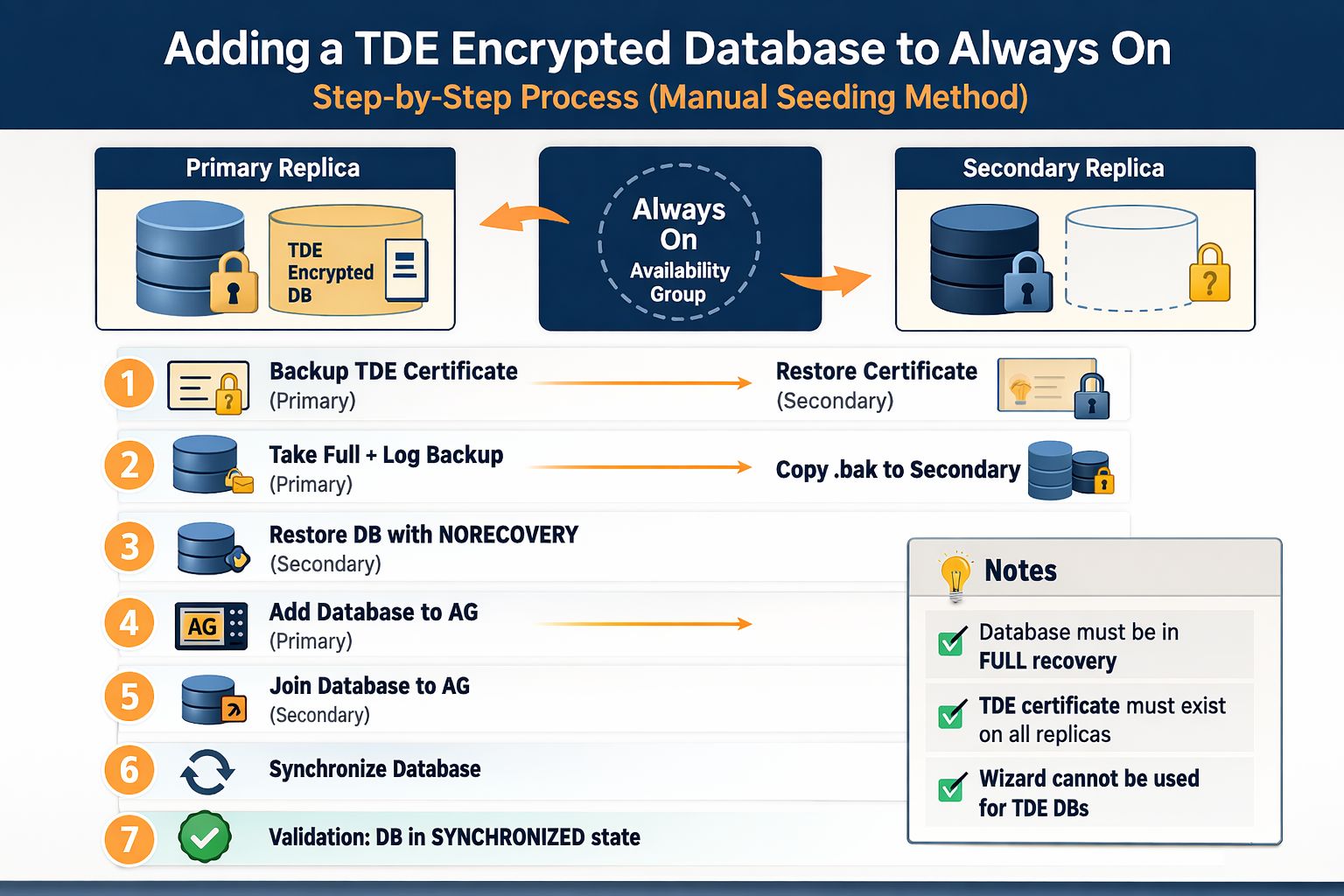
🔍 What’s actually happening?
SQL Server is refusing to add the database because it cannot decrypt it on the secondary replica.
When Transparent Data Encryption (TDE) is enabled:
• The database is encrypted using a Database Encryption Key (DEK)
• That key is protected by a certificate stored in the master database
👉 The problem:
That certificate exists only on the primary server, not on the secondary.
So when the Availability Group wizard tries to seed or restore the database on the secondary, SQL Server cannot decrypt the backup — and the operation fails.
🛠️ The correct approach
Instead of relying on the SSMS wizard, follow this workflow:
1️⃣ Backup the TDE certificate and private key from the primary server
2️⃣ Restore the certificate on the secondary replica
3️⃣ Perform manual seeding (Full + Log backup)
4️⃣ Restore the database using NORECOVERY
5️⃣ Add the database to the Availability Group using T-SQL
✅ Once the certificate exists on both replicas, the database joins the AG successfully.
⚠️ Why this matters
Missing this step in production can lead to:
• Failed deployments
• Synchronization issues
• Delays in HA/DR setup
💡 This is a great reminder that sometimes the issue isn’t performance, indexing, or storage — it’s security architecture interacting with high availability design.
👇 Have you run into this with Always On + TDE?